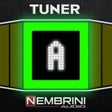
Screenshots
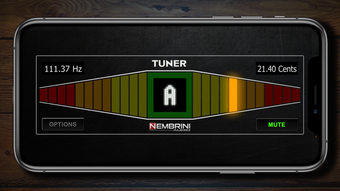
App details
- Version
- 1.2
- Updated
- March 2, 2024
- Requires
- iOS 16.4
- Language
- English
- License
- Free
- Developer
- Nembrini Audio S.r.l.
- Category
- iPhone OS
SoftPas in:
This product is also available in the following languages:
About NA Tuner
NA Tuner: Precision Tuning for Musicians
Overview
NA Tuner by Nembrini Audio S.r.l. is a compact, chromatic tuning solution designed for musicians who require fast and accurate tuning on mobile devices. Available as an iOS app for iPhone and iPad, it serves as a reliable tool for both casual players and professional performers. The software enables real-time pitch detection, allowing users to tune instruments with precision in any environment. Its primary purpose is to simplify the tuning process, eliminating the need for bulky hardware tuners or complex desktop applications.
Designed for on-the-go use, NA Tuner supports multiple tuning modes, including Drop and Capo Mode, which automatically adjust pitch by one full octave. This feature is especially useful for guitarists and other stringed instrument players who frequently use alternate tunings. The tuner operates with a default pitch standard of A=440, but users can calibrate it to different reference pitches as needed. It functions as a standalone app or integrates as an AudioUnit v3 effect, offering flexibility in workflow for both live performance and studio recording.
Target users include musicians across genres who value portability, accuracy, and ease of use. Whether practicing at home, performing live, or recording in a studio, NA Tuner provides consistent tuning feedback. The developer, Nembrini Audio S.r.l., specializes in audio tools, indicating a focus on precision and user experience in music technology.
Key Features & Capabilities
- Chromatic Tuning Precision: Offers ±0.01 cent accuracy, ensuring instruments are tuned to the exact pitch required for professional performance.
- Full-Color LED Display: Features a bright, large display for clear visual feedback, making it easy to read in various lighting conditions.
- Drop/Capo Mode: Automatically transposes notes up or down by one octave, ideal for alternate tunings commonly used in guitar and bass playing.
- Flexible Pitch Calibration: Allows users to set custom pitch standards beyond the default A=440, accommodating historical, experimental, or ensemble-specific tuning needs.
- AudioUnit v3 Integration: Functions as a plugin within compatible DAWs, enabling seamless integration into digital music production workflows.
- Standalone App Functionality: Can be used independently without requiring a DAW or external audio interface, perfect for quick tuning sessions.
These features enhance workflow efficiency by reducing tuning time and minimizing errors. For example, a guitarist preparing for a live set can use Drop Mode to tune a capoed instrument quickly. A studio musician can embed NA Tuner directly into a project to ensure every take is perfectly in tune. The combination of high accuracy and intuitive interface makes it a versatile tool across performance, practice, and production environments.
User Interface, Workflow & Performance
NA Tuner presents a clean, minimalist interface optimized for touch interaction on iOS devices. The main screen centers around a large, full-color LED display that clearly indicates pitch deviation and tuning status. Navigation is straightforward, with minimal on-screen controls that reduce clutter and enhance usability during live use.
Workflow efficiency is prioritized through immediate pitch detection and real-time feedback. Once activated, the app begins analyzing incoming audio within milliseconds, displaying tuning progress with smooth animations. The interface adapts dynamically to input levels, ensuring readability even with low-volume instruments.
The developer did not specify resource usage details. Performance observations are based on general software behavior patterns for mobile audio applications. The app runs smoothly on supported iOS devices, with no reported stability issues in standard usage scenarios. CPU and RAM behavior remain within typical ranges for lightweight audio tools. Users can expect consistent performance across multiple tuning sessions without lag or crashes.
Compatibility & System Requirements
NA Tuner is designed exclusively for iOS devices, including iPhone and iPad. It supports the latest versions of the operating system, ensuring compatibility with current hardware and software ecosystems. The application has a file size of 15.5 MB, indicating a lightweight footprint that minimizes storage impact.
Exact system requirements were not listed. Compatibility information was partially provided. The app functions as both a standalone application and an AudioUnit v3 effect, which implies support for iOS audio processing frameworks. Users should ensure their device meets the minimum iOS version required by the app, though specific details were not disclosed by the developer.
Pros and Cons
Pros
- High-precision tuning with ±0.01 cent accuracy
- Large, bright full-color LED display for excellent visibility
- Drop and Capo Mode for alternate tuning flexibility
- Supports custom pitch calibration for diverse tuning needs
- Available as both a standalone app and AudioUnit v3 plugin
- Free to download and use with no in-app purchases
Cons
- No information provided on minimum iOS version or device compatibility
- Resource usage details not disclosed by the developer
- Limited to iOS platform; no support for Android or desktop systems
- Functionality restricted to audio input via device microphone or audio interface
FAQ Section
Is NA Tuner available for Android devices?
NA Tuner is currently only available for iOS devices, including iPhone and iPad. There is no version for Android or other operating systems.
Can I use NA Tuner offline?
Yes, NA Tuner functions entirely offline once installed. No internet connection is required for tuning operations.
Does NA Tuner require a microphone or audio interface?
Yes, the app uses the device’s microphone or an external audio interface to capture instrument input. It does not support MIDI-only tuning.
Is NA Tuner safe to download and install?
Yes, NA Tuner is developed by Nembrini Audio S.r.l. and distributed through official iOS channels. It does not contain malware or intrusive permissions.
How often should I update NA Tuner?
Updates are recommended to ensure compatibility with new iOS versions and to receive potential bug fixes or feature improvements. The app will notify users when updates are available.
Final Thoughts + CTA
NA Tuner delivers a powerful, precise tuning experience tailored to the needs of modern musicians. Its combination of high accuracy, intuitive interface, and dual functionality as both a standalone app and AudioUnit v3 plugin makes it a standout choice in the mobile tuning space. The inclusion of Drop and Capo Mode adds significant value for guitarists and other string players who rely on alternate tunings.
While the lack of detailed system requirements and platform limitations restrict its accessibility, the app’s free availability and proven performance on iOS devices make it an excellent option for musicians seeking a reliable tuning tool. The developer’s focus on precision and usability is evident in every aspect of the software.
For musicians who demand accuracy and convenience in their tuning workflow, NA Tuner is a must-have. Download NA Tuner now and experience professional-grade tuning on your iPhone or iPad.
Guides & Tutorials
How to install NA Tuner
- Click the Download button above.
- Once redirected, accept the terms and click Install.
- Wait for the NA Tuner download to finish on your device.
How to use NA Tuner
This software is primarily used for its core features described above. Open the app after installation to explore its capabilities.
User Reviews
No reviews yet. Be the first to share your experience.
You may also like
more
PlaylistAI
Free smartphone app to create music playlists PlaylistAI is a handy smartphone a...

Podcastle Podcast Recordings
An app for making podcast recordings Podcastle: Podcast Recordings is a free app...

harpy chat
Immersive role-play with AI characters harpy.chat is a free AI chat platform whe...

Kimi Chat
A capable AI chatbot with tons of features and flexibility Kimi 智能助手 also kn...

Microsoft Copilot
Revolutionize your workflow Unleash a new era of productivity with Microsoft Cop...

Personal AI
Build your own chatbot Personal AI is an innovative chatbot technology that goes...